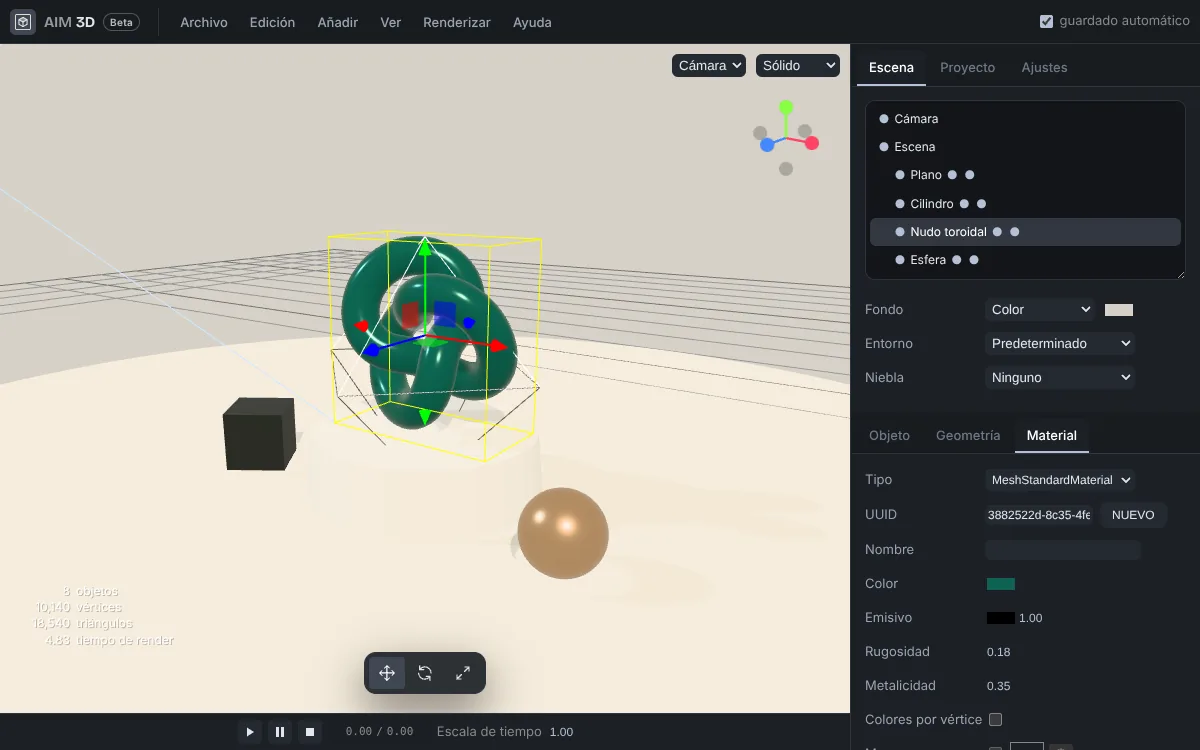
Shapes, text and lights in one click
Box, sphere, cylinder, capsule, torus, knot, lathe, tube and polyhedra, each with its size and detail editable afterwards. Extruded, bevelled 3D text, ambient, hemisphere, directional, point and spot lights, and perspective or orthographic cameras.
Materials that look real
Roughness and metalness for plastics, ceramics and metals; transmission and thickness for glass; clearcoat, iridescence and sheen; emission for things that glow. Add colour, bump, roughness or normal maps from your own images and set their tiling and rotation.
Studio light and environment
A colour, image or 360° panorama background, environment lighting that gives believable reflections instantly, fog, soft shadows and exposure tone. The product studio, abstract composition and 3D logo templates give you a polished starting point.
Place things precisely
Move, rotate and scale with the viewport handles or exact values, organise the scene into groups by dragging in the outliner, duplicate and undo without limit. Keyboard shortcuts for every tool and a view that focuses on your selection.
Open the models you already have
glTF and GLB (including Draco-compressed and KTX2 textures), FBX, OBJ with its MTL, STL, PLY, 3MF, DAE, 3DS, USDZ, VOX and SVG. Drop the model and its textures onto the viewport, or a ZIP with everything, and it lands in place.
Model animation
Models that come with animations keep them: the animation panel lists them and plays, pauses and scrubs through them so you can pick the exact moment for your scene.
Export for every destination
GLB and glTF for the web, other 3D apps and game engines; USDZ for augmented reality on mobile; STL and PLY for 3D printing; OBJ for exchange. Export the whole scene or just the object you pick, with the AIM CREATE signature in the file.
Your scene, kept safe
It saves itself in your browser as you work and comes back when you return, with your change history if you want it. Save the whole project as an .aim3d file to carry on on another computer or share it.